
Markdown note-taking apps have quietly become the default for anyone serious about owning their knowledge long-term. The format is future-proof, the files are portable, and you're never one pricing change away from losing access to years of work.
"Markdown app" covers a lot of ground though. Some are built for linking ideas across thousands of notes. Some are built for developers who think in code blocks. Some are built for people who just want their notes encrypted and synced without drama.
This list covers five apps, each strong for a specific use case, so you can find the one that fits how you actually think and work.
Top markdown note-taking apps compared
| App | Best For | Open Source | Local Files | Price |
| Char | Meeting notes | ✅ | ✅ | Free / $25/mo |
| Obsidian | Personal knowledge management | ❌ | ✅ | Free / $4/mo sync |
| Logseq | Daily journaling & outlining | ✅ | ✅ | Free |
| Joplin | Cross-device sync with privacy | ✅ | ✅ | Free / 2.99€/mo |
| Inkdrop | Developers | ❌ | ❌ | $8.31/mo |
The best markdown note-taking apps, reviewed
1. Char: best markdown note-taking app for meetings
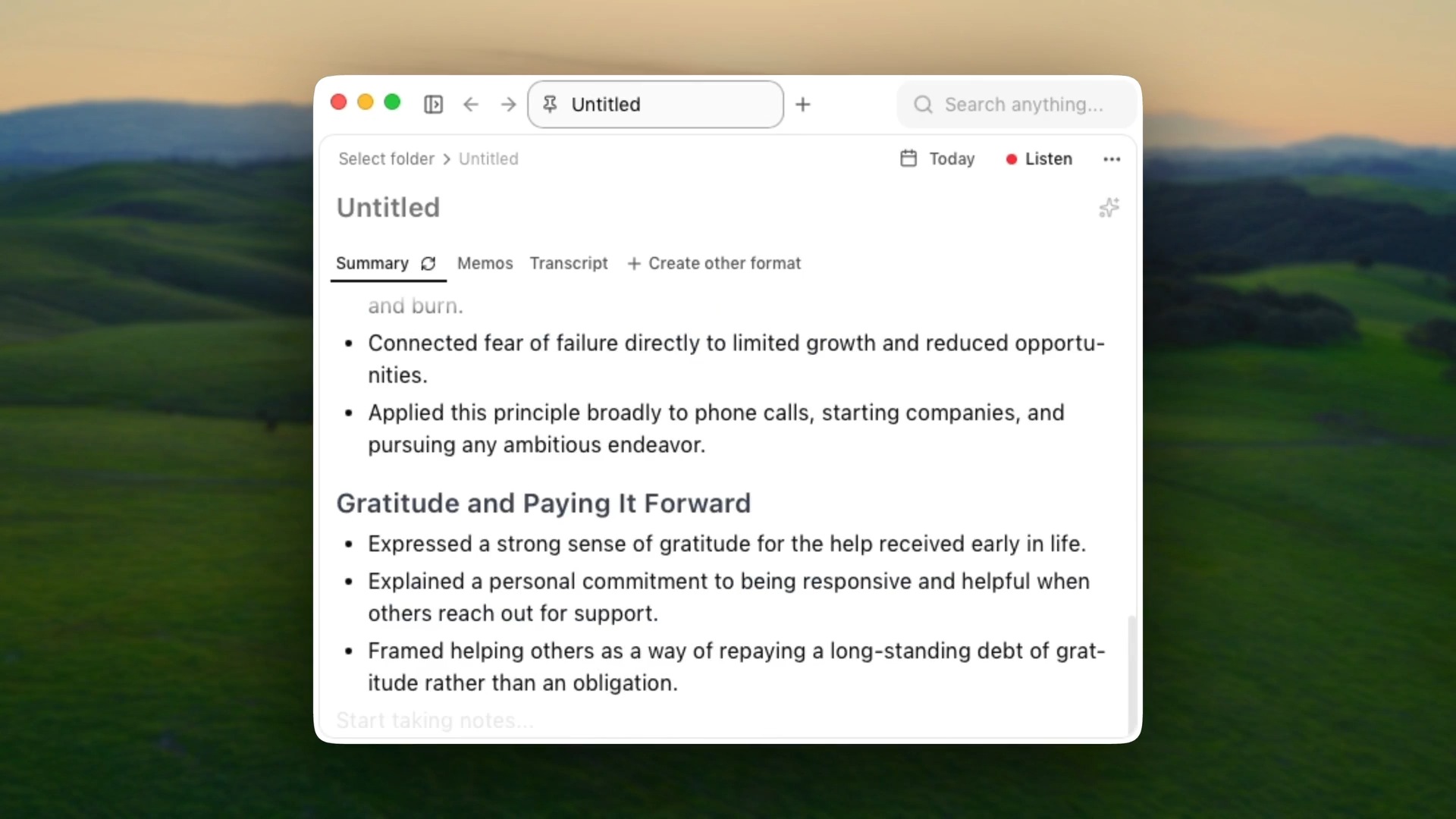
Char (formerly Hypernote) is an open-source AI notepad built specifically for meetings. It transcribes your conversations in real-time, and when the meeting ends, it combines the transcript with your manual notes to create the perfect summary. No bots join your calls, everything is stored as plain markdown files with zero lock-in, and you get to choose your preferred STT and LLM provider.
Key Features:
- System audio capture - No bots joining your calls. No calendar permissions needed. Works on Zoom, Teams, phone calls, and in-person conversations
- Real-time transcription - Live transcript generates as the meeting happens, so you can follow along instead of furiously typing
- AI summaries - Combines your own notes with the transcript to produce structured summaries with action items
- Your choice of AI stack - Use Char's managed cloud service, bring your own API keys (OpenAI, Anthropic, Deepgram, others), or run fully local via Ollama or LM Studio
- Plain markdown files - Every meeting is a .md file stored on your computer. Open it in Obsidian, VS Code, Notion, anywhere
- Custom templates - Set up templates for recurring meeting types so your summaries are always structured the same way
- AI chat - Query your transcripts after the fact. Ask what was decided, what's pending, what someone said
- Search - Semantic search across every meeting you've ever recorded
- 45+ language support
- Open source - IT and security teams can audit the code before approving it
Pros:
- Data never has to leave your device
- Switch AI providers anytime - no forced stack
- Works with local models, so you can go fully offline
- Open source builds trust for regulated industries and security-conscious teams
- Works for any conversation, not just video calls
Cons:
- macOS only currently - Windows and Linux coming in Q2 2026
- No mobile app yet
- No video recording
Pricing:
Free plan with local transcription or bring-your-own-key. Pro is $25/month for the managed cloud service.
2. Obsidian - best markdown note-taking app for personal knowledge management
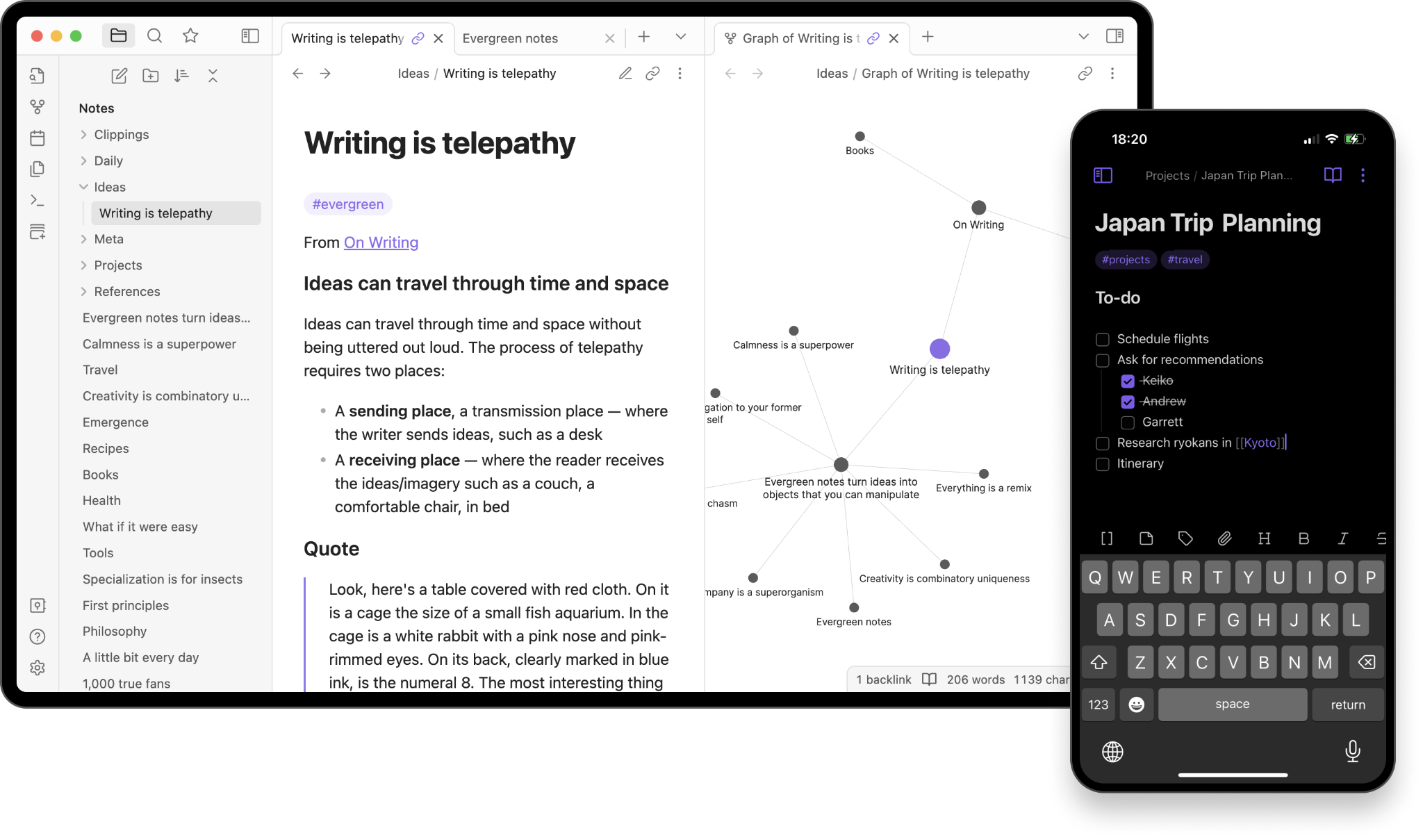
Most note apps make you forget what you wrote six months ago. Obsidian keeps everything linked instead.
Opening one note pulls you into three others you forgot existed but suddenly need. The more you use it, the more useful it gets. It's built for people who think in connections, not folders.
Key Features:
- Wiki-style links - Connect notes by typing [[note name]]. Build a web of linked ideas, people, projects, books, anything
- Graph view - Visual, interactive map of how all your notes connect
- Canvas - Infinite whiteboard for brainstorming, diagramming, and laying out ideas spatially
- Local markdown files - Everything stored as .md files on your device. Open them in any editor, any time
- 1,000+ community plugins - Extend Obsidian into basically whatever you need it to be
- Obsidian Sync - Optional end-to-end encrypted sync across devices with one year of version history and shared vault collaboration
- Obsidian Publish - Turn your notes into a public wiki, knowledge base, or digital garden
- Works completely offline - No internet required for core functionality
- Mobile apps - iOS and Android, with full vault access
Pros:
- Free for personal use with zero feature restrictions, no sign-up required
- Sync works with whatever you already use (iCloud, Dropbox, Google Drive) or pay for Obsidian Sync if you want something purpose-built
- Plugin ecosystem means the app grows with your needs
- Meeting notes from Char land directly in your vault since both use markdown
- Active community with real depth - forums, Discord, YouTube channels dedicated to workflows
Cons:
- The flexibility comes with complexity. Learning curve is steep if you want anything beyond basic note-taking
- Easy to fall into the productivity trap of endlessly tweaking your system instead of using it
- Not visually polished out of the box - you'll want to install a theme
- Closed source, which is a notable tension for a tool that markets hard on trust and ownership
- No built-in AI - you'll need plugins or external tools for that
Pricing:
Free for personal use, no limits, no sign-up. Obsidian Sync is $4/user/month billed annually. Obsidian Publish is $8/site/month. Commercial use requires a $50/user/year license.
3. Logseq - best markdown note-taking app for daily journaling & outlining
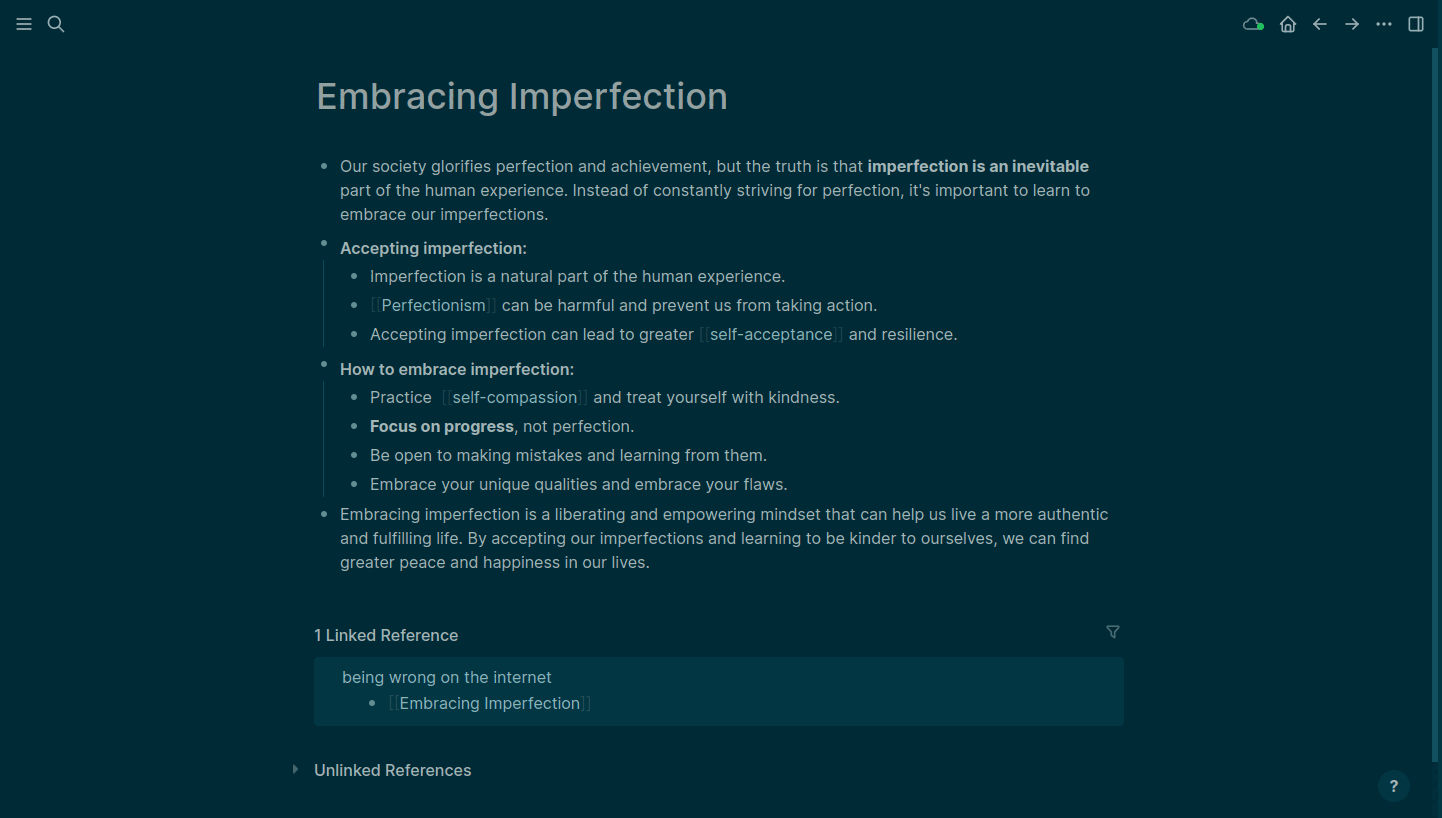
Logseq clicked when I stopped trying to organize it and just started writing. You open it, land on today's journal page, and go. No deciding where a note lives. No folder structure to maintain.
Every bullet point is a block that can be linked, referenced, and surfaced anywhere else in your graph. Organization happens as a byproduct of writing, not before it.
Key Features:
- Daily journal - Every day starts with a fresh page. Just write. No upfront organization required
- Outliner-first - Everything is a block. Indent, collapse, reference, and embed blocks across any page
- Bidirectional linking - [[link]] anything and backlinks surface every place it's been mentioned
- PDF annotations - Highlight and annotate PDFs directly inside Logseq, with annotations linked back into your notes
- Flashcards - Built-in spaced repetition from any block
- Whiteboards - Infinite canvas for pulling notes out of the graph and thinking spatially
- Queries - Pull any information back out of your graph with structured queries
- 150+ plugins - Task management, custom views, integrations
- Local markdown files - Everything stored as .md files you own
- Logseq Sync - Encrypted file syncing across devices (beta)
- Mobile apps - iOS and Android
Pros:
- The daily journal approach cuts friction. You stop procrastinating on "where to put this" and just write
- Bidirectional linking is more fluid here than elsewhere - connections emerge naturally rather than being manually managed
- PDF annotation is class-leading and built in natively, not a plugin afterthought
- Free forever for personal use, open source, data stays local
- The longer you use it, the more useful the graph becomes
Cons:
- Performance degrades with large graphs - slow startup, laggy rendering, real complaints at scale
- Mobile app is rough, sync is still beta, and reliability issues have frustrated longtime users
- Development has stalled. The team has been deep in a database rewrite for years, the plugin ecosystem has quieted, and community momentum has noticeably dropped
- The upcoming database version moves away from pure markdown, which is a genuine concern for anyone who picked Logseq specifically for file portability
- Advanced queries have a steep learning curve and poor documentation
Pricing:
Free for personal use. Logseq Sync is in beta. No paid tiers beyond sync.
4. Joplin - best markdown note-taking app for cross-device sync with privacy
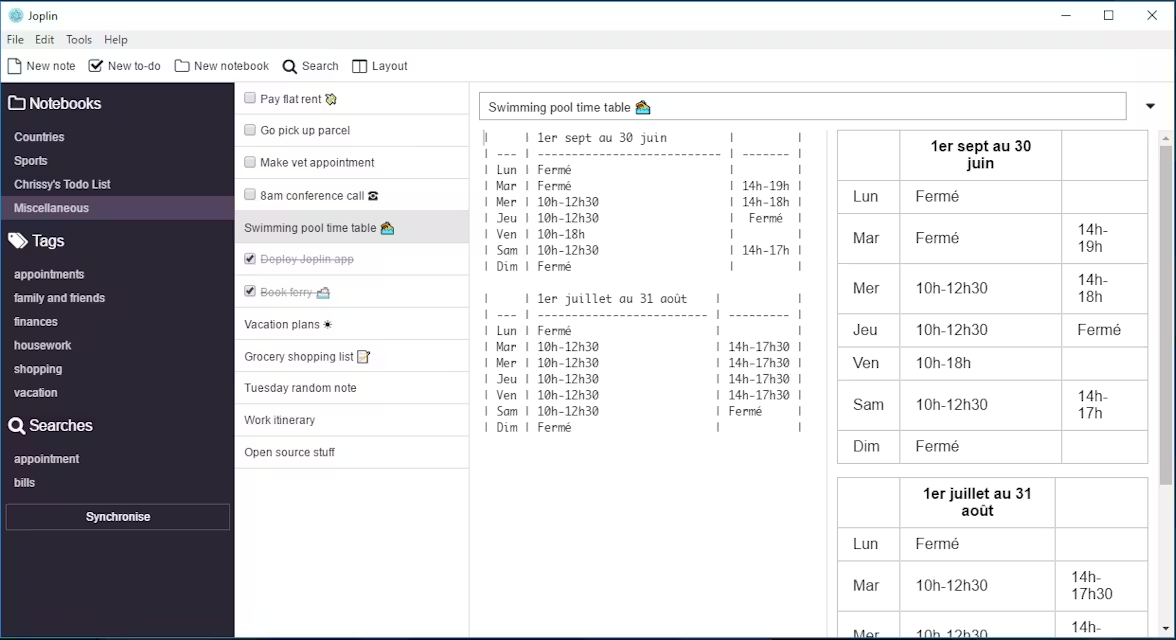
Joplin does one thing exceptionally well: keeping your notes encrypted, portable, and in sync across every device you own using whatever cloud storage you already pay for. No vendor lock-in on sync, no paywall surprises, no compromise on privacy.
Key Features:
- End-to-end encryption - Notes are encrypted before they ever leave your device. Nobody else can read them, including the Joplin team
- Flexible sync - Works with Joplin Cloud, Dropbox, OneDrive, Nextcloud, WebDAV, or S3. You're never locked to one provider
- Rich and markdown editors - Switch between a rich text editor and a markdown editor depending on your preference. Markdown isn't mandatory
- Web clipper - Browser extension for Chrome and Firefox to save web pages directly as notes
- Notebooks and tags - Hierarchical notebooks with sub-notebooks, plus tags for cross-cutting organization
- Multimedia notes - Images, PDFs, audio, video, and file attachments all supported
- To-do lists and reminders - Built-in task management with checkboxes and due dates
- Plugins - Extensible via community plugins on desktop
- OCR search - Find text inside images and PDFs
- Terminal app - Full CLI version for the truly keyboard-driven
- Available on Windows, macOS, Linux, Android, and iOS
Pros:
- The sync flexibility is genuinely unmatched - no other free app lets you bring your own backend with E2EE
- Desktop app is solid and reliable, users regularly report six-plus years of daily use without issues
- Completely free with no note limits, no device limits, no paywall surprises
- Rich text editor means markdown is optional - lower barrier than most apps in this list
- Open source with an active community and web clipper that actually works
- Exports to JEX, PDF, HTML, and raw markdown - getting your data out is never a problem
Cons:
- Mobile app lags significantly behind the desktop - no background sync means you have to babysit it, and conflicts happen if you forget to sync before switching devices
- UI feels dated, especially on Android - functional but not something you'd call polished
- Sync setup has a learning curve; first-time configuration trips up non-technical users
- Plugin support is desktop-only, so the mobile experience is notably more limited
- Not designed for linked, networked notes - if you want backlinks and graph views, this isn't that
Pricing:
Completely free with self-managed sync. Joplin Cloud starts at 2.99€/month for hosted sync if you'd rather not set it up yourself.
5. Inkdrop - best markdown note-taking app for developers
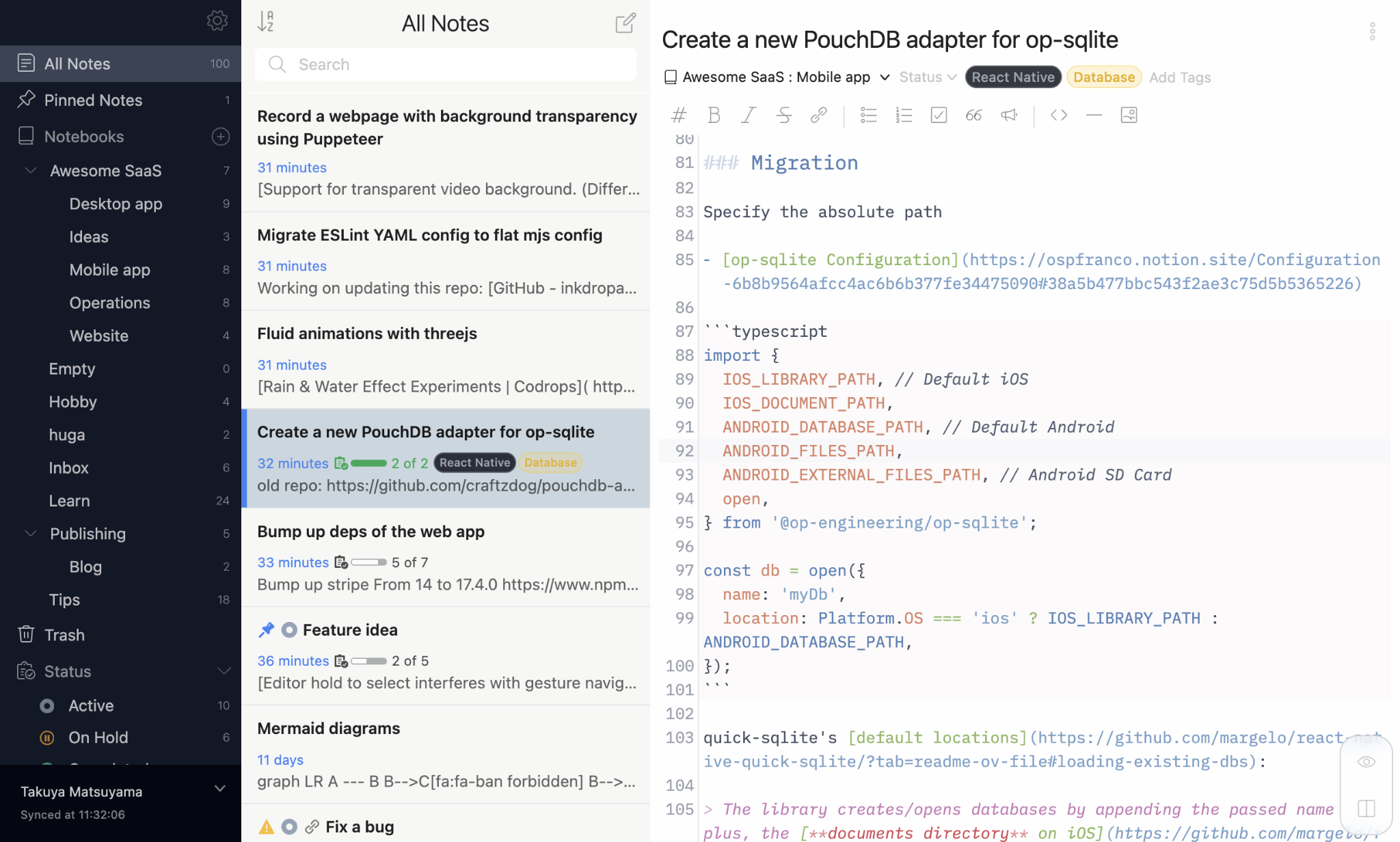
Most note apps tolerate developers. Inkdrop is built for them. Vim keybindings, multi-language code highlighting, Mermaid diagrams, KaTeX math, multi-cursor editing - it's all there without hunting for plugins. The whole thing is built by a single developer, Takuya Matsuyama, who clearly uses it himself, and that shows in how deliberate every feature decision feels.
Where Obsidian gives you a blank canvas to build whatever system you want, Inkdrop gives you a clean, opinionated workflow that gets out of your way. Less tinkering, more writing.
Key Features:
- Markdown editor built for code - multi-language syntax highlighting, multi-cursors, line numbers, invisible character display, and vim/emacs/Sublime keybindings
- 100+ plugins - extend with math (KaTeX), Mermaid diagrams, table of contents, code titles, and more
- End-to-end encrypted sync - notes encrypted before they leave your device, synced instantly across all platforms
- Note status - mark notes as active, on hold, completed, or dropped. Useful for tracking work in progress
- Nestable notebooks + tags + pin-to-top - flexible organization without forcing a rigid structure
- Distraction-free mode - clean writing environment that hides everything but the text
- Web clipper - Chrome and Firefox extensions to clip articles directly into your notes
- MCP server - lets AI tools search your notes, understand context, and generate new notes from existing content
- Revision history - every note version saved automatically
- Raycast and Alfred integration - access notes without ever opening the app
- Available on macOS, Windows, Linux, iOS, and Android
Pros:
- The most polished cross-platform experience in this list - desktop and mobile feel consistent, sync is instant and reliable
- Developer-specific features are native, not bolted on via plugins
- Offline-first, so the app is always ready regardless of connectivity
- UI is genuinely clean - users consistently praise how unobtrusive it feels
Cons:
- Notes are stored in an internal database, not plain markdown files - you can export, but you can't just open your vault in another editor
- Pricing jumped from $4.99 to $8.31/month, which stings for a single-developer app and has driven some users away
- No backlinks or graph view - not designed for networked knowledge, purely note organization
- Smaller plugin ecosystem compared to Obsidian
- The whole product depends on one person - not a criticism of Takuya, but worth knowing
Pricing:
$8.31/month billed annually. 30-day free trial, no credit card required.
Other markdown note-taker apps worth knowing
1. Zettlr
Zettlr is a strong app with a specific audience: academics and researchers doing citation-heavy writing. The Zotero integration, reference manager support, and export pipeline to LaTeX and PDF work well for that workflow. If you're writing papers with footnotes and bibliographies, Zettlr deserves a serious look. For everyone else, it's more tool than needed.
2. MarkText
MarkText has one of the cleanest writing experiences in this list - distraction-free, real-time preview, good theme selection. Development has stalled though, which is a real concern for a tool you're trusting with long-term notes. Worth trying if you need a focused writing editor, but not somewhere to plant your entire knowledge base.
3. Notable
Notable is deliberately minimal: tag-based organization, split-pane editor, no frills. For users who find Obsidian overwhelming and just want a clean place to write and find notes quickly, that simplicity is appealing. It didn't make the cut because the feature set hasn't kept pace with the alternatives, and development has been sparse in recent years.
4. Zim
Zim is the oldest app on this list and quietly one of the most reliable. Long-time users describe it as bulletproof - fast, stable, and does exactly what it claims. The interface looks like it was built in 2008 because it was, and that puts off a lot of people. But if you run Linux and want a desktop wiki that just works forever without surprises, Zim has a loyal following.
What are the best markdown apps for note-taking?
If you're in back-to-back meetings and losing track of what was said and decided, start with Char. Everything else on this list is for organizing knowledge you've already captured - Char is for capturing it in the first place.
If you want to build a knowledge base that gets more valuable the longer you use it, Obsidian is the answer. It takes investment to set up, but nothing compounds like a well-linked vault over years.
If you hate deciding where to put things and just want to write, Logseq removes that friction entirely. Open it and start. The graph does the organizing for you. Go in aware of the development uncertainty though.
If you need your notes on every device, encrypted, without paying anyone a monthly fee, Joplin is the most practical choice here. The desktop app is rock solid. Manage your expectations on mobile.
If you're a developer and the first thing you check in any note app is whether it has Vim mode, download Inkdrop.