
Tactiq is one of the lighter, smarter approaches to meeting transcription. It runs as a Chrome extension, captures live captions from Google Meet, Zoom, or Teams without sending a bot into the call, and generates AI summaries from the text. Over a million people use it weekly, and for a browser-based tool, it handles the basics well.
But the Chrome dependency is also its ceiling. You have to join meetings through the browser, not the Zoom desktop app or Teams client.
I spent weeks testing alternatives that remove that ceiling in different ways. Here are seven tools worth a look.
List of the Best Tactiq Alternatives
| Tool | Chrome extension | Best For | Pricing |
| Char | No | Developers and tech founder who want control over their data and AI stack | Free (local/BYOK); Pro $25/mo |
| Otter.ai | Yes | Teams that need cross-meeting search and a mature knowledge base | Free (300 min/mo); Pro $16.99/mo |
| Granola | No | Individuals who want a notepad-first workflow without a meeting bot | ~$14/mo (Business) |
| Fathom | Yes | Solo users who want unlimited free transcription with fast summaries | Free (unlimited); Team from $32/user/mo |
| Fireflies.ai | Yes | Sales teams that need deep CRM sync and conversation analytics | Free (800 min/mo); Pro $10/user/mo |
| tl;dv | Yes | Distributed teams sharing async video clips from meetings | Free (unlimited); Pro $29/user/mo |
| Notta | Yes | International teams needing multilingual transcription and translation | Free (limited); Pro $13.49/user/mo |
Best Tactiq Alternatives for Meeting Transcription in 2026
1. Char
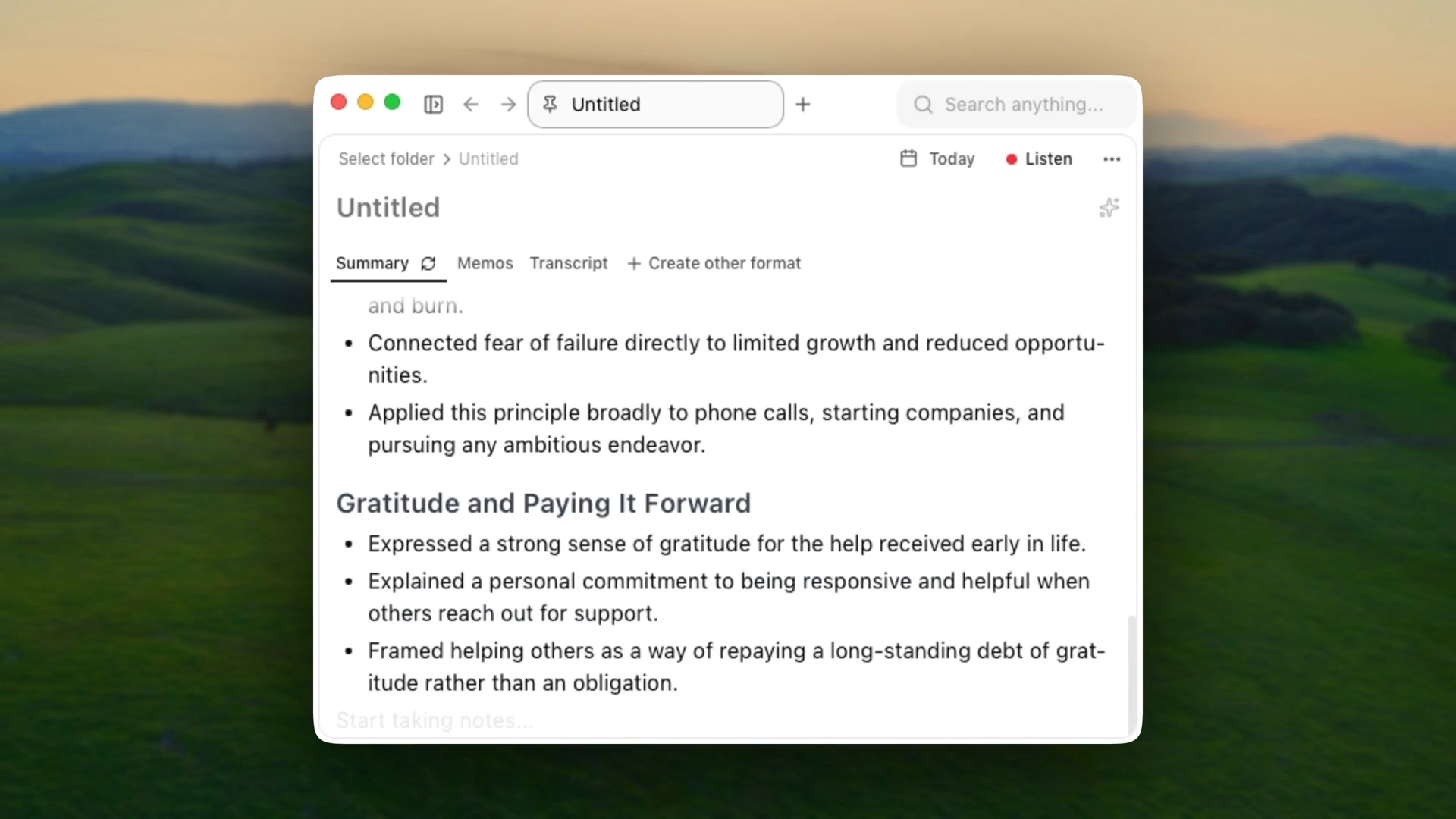
Char is an open-source AI notepad for meetings, built for people who want to own their data.
Where Tactiq captures text inside Chrome, Char is a desktop app that records system audio from any meeting platform: Zoom, Teams, phone calls, even in-person conversations.
It transcribes in real time while you take notes in a built-in editor, then combines both into a structured summary after the call. No bot joins your meeting and no calendar permissions are required.
What works
- Save your notes in your desired folder. If Char disappeared tomorrow, your data would still be exactly where you left it.
- You choose your own AI stack: Char's managed cloud, your own API keys (OpenAI, Anthropic, Deepgram), or fully local models through Ollama or LM Studio for offline operation.
- System audio capture means it works with any meeting platform without a bot or calendar permissions. For teams whose companies have banned cloud-based tools like Otter or Granola, this is the only option that keeps everything on-device without compromise.
- Open-source codebase. Your security team can audit exactly how data is handled.
- The notepad mode lets you take your own notes during the call. The AI combines your notes with the transcript into structured output, so summaries reflect what you thought was important, not just what the AI picked up.
What doesn't
- macOS and Linux only. No Windows client yet.
- No mobile app, no video recording.
- No built-in CRM integrations yet.
Pricing
Free with on-device transcription and bring-your-own keys; Lite at $8/month adds cloud transcription and speaker ID; Pro at $25/month adds sync, integrations, and shareable links.
2. Otter.ai
Otter is the most established name in AI meeting transcription, with over 25 million users. Its OtterPilot bot auto-joins your scheduled meetings on Zoom, Meet, or Teams, transcribes everything, and generates AI summaries with action items. Unlike Tactiq, Otter is a standalone app that works outside the browser.
What works
- Cross-meeting search is the standout feature. You can ask "What did Sarah say about the Q4 budget?" and get an answer pulled from months of recordings. No other tool on this list does this as well.
- OtterPilot auto-joins scheduled meetings with zero manual effort.
- Mature collaboration features: shared notes, highlights, comments, team workspace with usage analytics.
- Speaker identification works reliably after initial voice training.
What doesn't
- A federal class-action lawsuit filed in August 2025 accuses Otter of "deceptively and surreptitiously" recording private conversations and using them to train its AI without consent from all meeting participants. The suit alleges the bot records everyone in a call, including people who never signed up for the service.
- The bot ("Otter.ai") joins meetings as a visible participant. Clients notice.
- AI transcription only works in English, French, and Spanish. Significant gap for international teams.
- Free tier burns through fast: 300 minutes per month with a 30-minute cap per conversation.
Pricing
Free (300 min/mo, 30-min cap); Pro $16.99/month ($8.33 annually); Business $30/user/month.
3. Granola
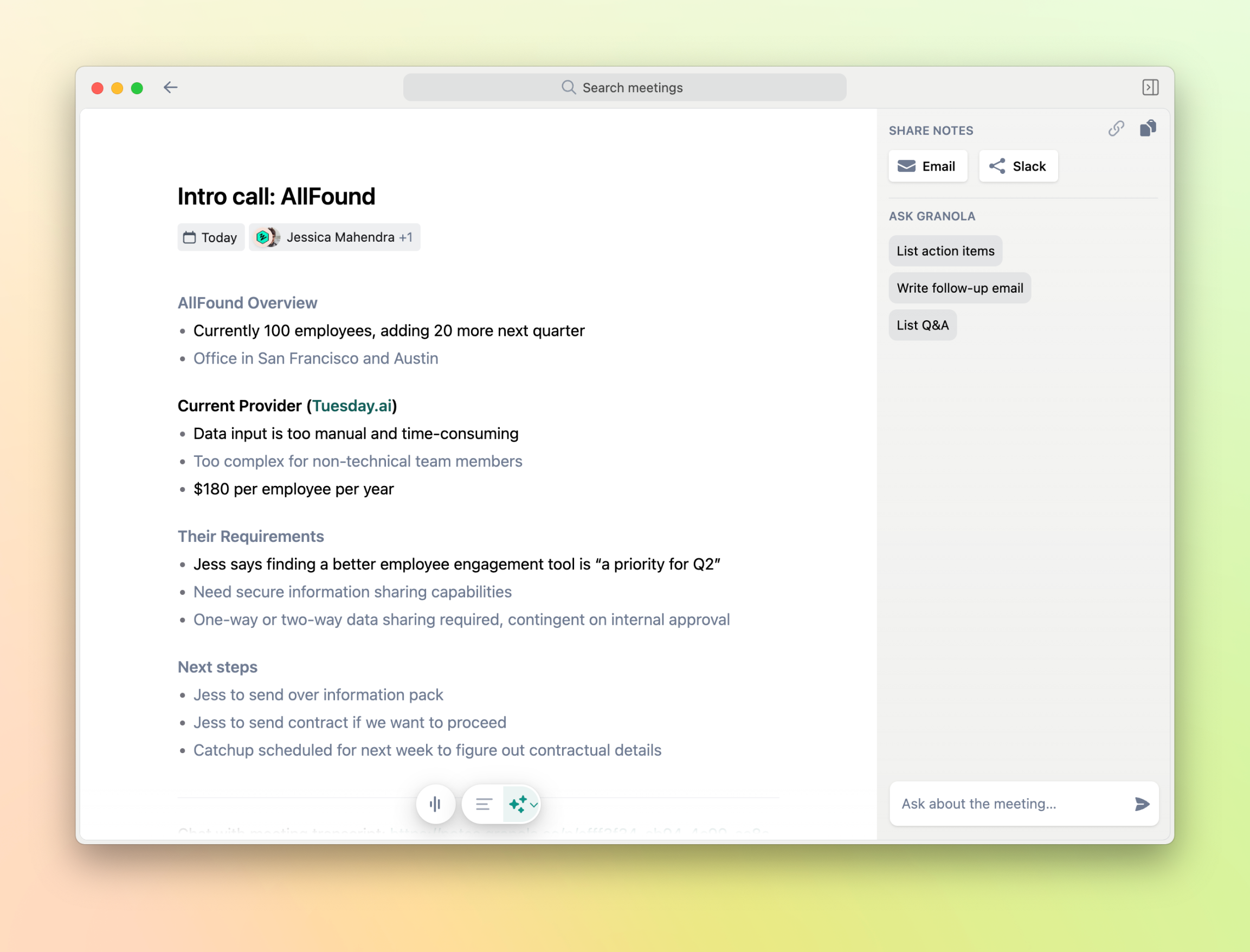
Granola is a desktop app that, like Char, captures system audio and skips the bot. You take notes during the meeting in Granola's notepad, and the AI fills in everything you missed using the transcript. The calendar sync works out of the box, and the note quality is consistently strong.
What works
- No bot joins your call. No awkward notifications for other participants.
- Templates for different meeting types (standup, 1:1, client call) produce well-structured output with minimal setup.
- Calendar integration is fully automatic. Granola detects meetings and is ready before you are.
- Works on macOS and Windows, which gives it broader reach than Char's macOS/Linux support.
What doesn't
- In March 2026, Granola encrypted its local database, breaking every agent workflow and third-party tool that had been reading notes directly from the file system.
- A security researcher discovered in May 2025 that Granola's beta had shipped with a hard-coded AssemblyAI API key, potentially exposing user transcripts. Fixed before public release, but it raised questions about security practices.
- Requires a Google account to sign up, which excludes Microsoft-only organizations.
- Data training is on by default. You have to find and toggle an opt-out in settings.
- No mobile app. No full transcript bulk export until recently.
Pricing
Business plan at ~$14/month; requires a Google account to sign up.
4. Fathom
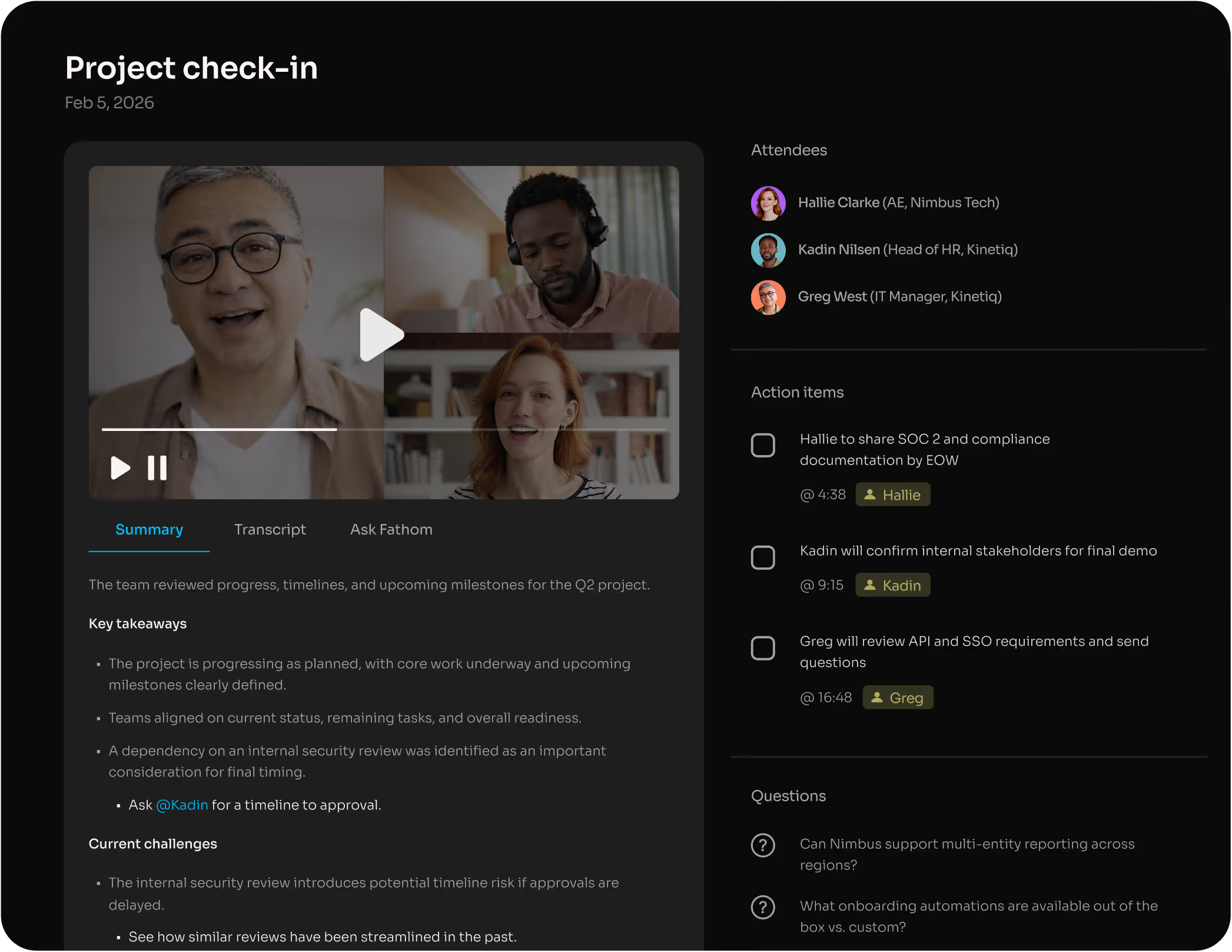
Fathom has disrupted the pricing model of this entire category by offering unlimited free transcription for individual users. No credit card, no time limits, no catch.
It sends a bot into your Zoom, Meet, or Teams call, records everything, and produces AI summaries that are often ready before the meeting ends.
The interface is clean and uncluttered, and the highlight clip feature lets you share short video moments with teammates who missed the call.
What works
- Unlimited free transcription for individuals is unmatched in this category.
- Summary speed is the fastest I tested. Usable notes appeared consistently before Otter or Fireflies finished processing.
- CRM integration pushes notes directly to HubSpot or Salesforce after each call.
- Highlight clips let you mark key moments during a call and share short video excerpts.
What doesn't
- The free tier is individual only. Team features start at $32/user/month (Standard) or $39/user/month (Pro), which is significantly more than Fireflies or Otter at scale.
- Bot is visible to all meeting participants. For external or client-facing calls, this matters.
- No offline mode, no local storage. Everything lives in Fathom's cloud.
- Limited value outside of meeting transcription. No conversation analytics, no sentiment tracking.
Pricing
Free (unlimited individual); Team Standard $32/user/month, Team Pro $39/user/month.
5. Fireflies.ai
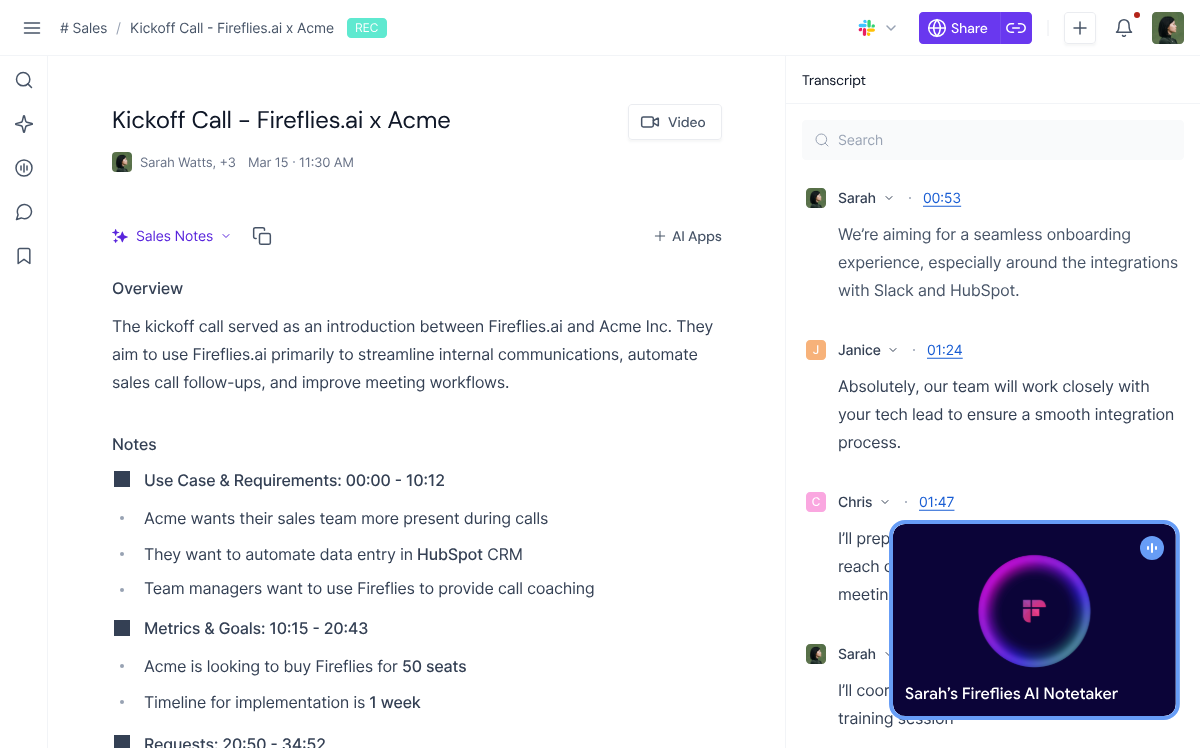
Fireflies is built for revenue teams. Where other tools stop at transcription, Fireflies layers on conversation analytics: talk-to-listen ratios, sentiment analysis, topic tracking, and custom vocabulary for industry-specific terminology.
The CRM integrations are the deepest I have tested. After connecting HubSpot, every client call automatically logged notes, action items, and summaries to the correct contact record without any manual work.
What works
- Native auto-sync with Salesforce, HubSpot, Pipedrive, and Zoho.
- Conversation analytics (sentiment, talk ratio, topic detection) are genuinely useful for sales coaching and pipeline reviews.
- Most generous free tier among bot-based tools: 800 minutes per month of storage.
- Works across Zoom, Meet, Teams, and Webex. Broader platform coverage than most competitors.
What doesn't
- Facing two class-action lawsuits under Illinois' BIPA. The first, Cruz v. Fireflies.AI Corp., filed December 2025, alleges the bot collected voiceprints from a participant who never created an account. The second, Fricker v. Fireflies.AI Corp., followed in March 2026 with the same pattern. Both claim the speaker recognition feature creates biometric identifiers without the written consent BIPA requires.
- Bot ("Fireflies.ai Notetaker") joins every meeting as a visible participant.
- Dashboard can feel overwhelming. The feature density that makes it great for sales teams makes it noisy for everyone else.
- Advanced analytics locked behind the Business tier at $19/user/month.
Pricing
Free (800 min/mo storage); Pro $10/user/month; Business $19/user/month.
6. tl;dv

tl;dv takes a different angle than the other tools on this list. The core idea is that most people do not need a full transcript or even a summary. They need the one moment that matters, packaged in a way they can send to someone who was not on the call.
tl;dv records your meeting, transcribes it, and lets you create timestamped video clips shareable via Slack, Notion, or a direct link. It is built for async-first teams more than for documentation.
What works
- Unlimited free recordings and transcriptions with no time cap. One of the most generous free tiers available.
- Timestamped video clips are the fastest way to share a specific meeting moment with someone who was not there.
- AI-powered search finds specific moments across all recordings, not just keywords in transcripts.
- Integrates with Slack, Notion, HubSpot, and project management tools for clip distribution.
What doesn't
- Bot joins your call visibly, same friction as Otter and Fireflies.
- AI summaries are limited on the free plan. You get the recordings but not the intelligence without paying.
- Pro plan at $29/user/month is steep for small teams, especially when the core value (clips) is available for free.
- 30+ languages supported, which is solid but behind Notta's 58. No offline mode, no local storage.
Pricing
Free (unlimited recordings and transcriptions); Pro $29/user/month.
7. Notta

Notta's strongest card is language coverage. It supports 58 languages for transcription and real-time translation for over 50, which is more than any other tool on this list. Tactiq claims 60+ languages for captions, but accuracy drops noticeably with accents and non-native speakers in practice.
What works
- 58 languages for transcription with real-time translation for 50+. Best-in-class for international and multilingual teams.
- Actually records audio and video, so you can replay meetings, verify exact wording, and export files. Essential for compliance-sensitive industries.
- Exports to DOCX, PDF, SRT, and other formats. Good data portability compared to tools that lock notes in proprietary views.
- Works on desktop, mobile, and browser. The broadest device coverage on this list.
What doesn't
- Bot joins calls visibly, same as Otter and Fireflies.
- Free plan is limited: 120 transcription minutes per month, 10 AI summaries per month.
- AI summary quality is decent but not as sharp as Fathom's or Granola's in my testing.
Pricing
Free (limited); Pro $13.49/user/month; Business $27.99/user/month.
Which Tactiq Alternative Is Right for You?
Char is the pick if data ownership is non-negotiable: plain markdown files, your choice of AI, fully offline capable.
Otter.ai has the most mature search and knowledge base, but the ongoing consent lawsuit and visible bot make it a harder sell for client-facing work.
Granola produces excellent notes without a bot, though the recent database encryption incident should give pause to anyone who builds agent workflows around direct file access.
Fathom is unbeatable for individuals on a budget: unlimited, free, fast. The team pricing is where it gets expensive.
Fireflies.ai earns its place for sales teams through CRM depth and analytics, but the BIPA lawsuits are a real consideration for organizations with Illinois-based participants.
tl;dv works best when you need to share moments, not documents, with teammates who were not on the call. And
Notta is the strongest option for multilingual teams that need transcription and translation accuracy across dozens of languages.
If you want prefer the local-first approach, download Char and try it on your next meeting.